Connecting Amazon
Connect or reconnect Seller Central and Amazon Ads.
MyProfit reads your Amazon data through two approvals you give on Amazon's own pages. Both are on Amazon connections.
| Connection | What it's for |
|---|---|
| Seller Central | Orders, Amazon's fees, settlements, returns, inventory, reimbursements and reports. Everything except ads. |
| Amazon Ads | Sponsored Products campaigns, spend and ad sales, for ad spend in your profit and the Advertising pages. |
Connecting Seller Central
It takes about two minutes. These are the screens you'll see.
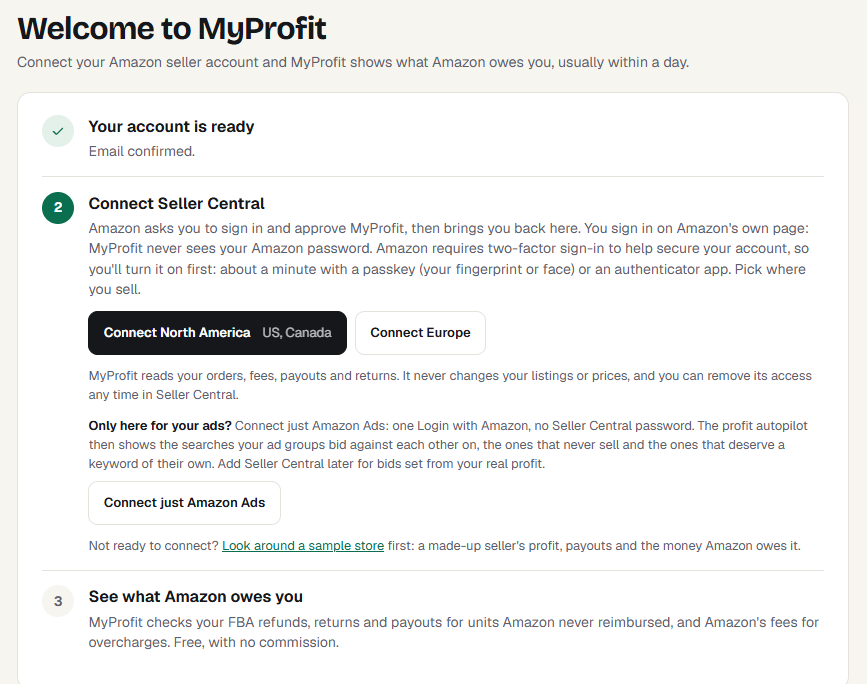
- On Get started (or Amazon connections), choose Connect North America (US and Canada) or
Connect Europe.
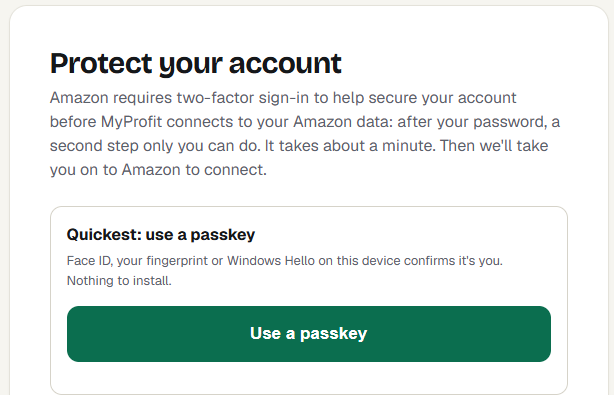
- The first time, MyProfit asks you to turn on two-step sign-in: Amazon requires it before any app can read seller data. A
passkey (Face ID, a fingerprint or Windows Hello) takes about a minute.
- Amazon asks you to sign in to Seller Central as the account owner or an admin user, even if you already are: that's Amazon's own security check, on Amazon's own page. MyProfit never sees your password.
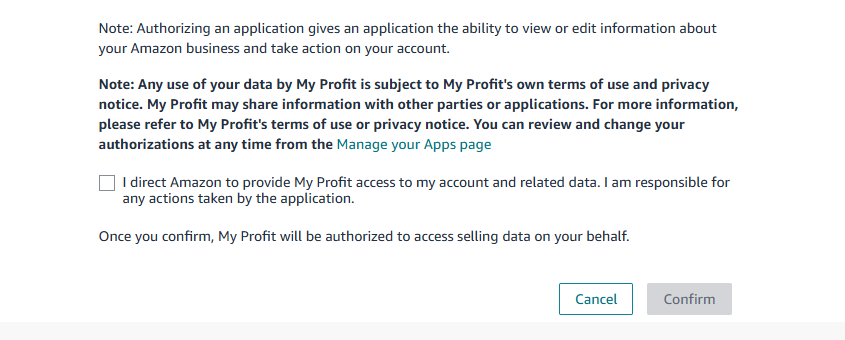
- Amazon's Authorize My Profit page lists the kinds of data MyProfit can use (what MyProfit uses each one for is
below).
 Tick the box at the bottom and choose Confirm.
- Amazon sends you back to MyProfit. Your latest orders show within minutes, and the past year of history usually within the hour. Reconnecting after a long break fills the gap the same way.
On a phone? Amazon asks for your Seller Central email, password and two-step code in the browser, even if you're signed in to the Amazon Seller app. If you don't have them to hand, connect from a computer instead.
What Amazon's list of permissions means
Amazon's “Authorize My Profit” page lists every kind of data the app can use. What MyProfit uses each one for:
| On Amazon's page | What MyProfit uses it for |
|---|---|
| Finance and Accounting | Your payouts, fees, refunds and reimbursements |
| Inventory and Order Tracking | Your orders and sales |
| Amazon Fulfillment | FBA stock, customer returns and your shipments to Amazon |
| Product Listing | Product titles, pictures and your listings |
| Pricing | Amazon's fee estimates for your products |
| Selling Partner Insights | Your store name and the marketplaces you sell in |
| Tax Remittance | Amazon's sales tax report, only if you turn on the sales tax import |
| Direct-to-Consumer Shipping | Buyers' shipping addresses for orders you ship yourself, only if you use Ship Orders; deleted 30 days after shipping |
| Buyer Solicitation | "Request a review" messages, only if you turn them on |
| Buyer Communication, Tax Invoicing | Not used by MyProfit |
Connecting Amazon Ads
Choose Connect Amazon Ads and allow access with the Amazon login you use for advertising. Ad reports load every night, so ad spend appears the next morning.
A profile marked No ad activity is connected but has no running campaigns; MyProfit checks it again every 30 days and starts loading once it finds ad activity.
Several marketplaces
With more than one marketplace connected, the menu has a marketplace picker at the top, and every page shows the marketplace picked there. When you sign in, MyProfit opens on the marketplace with the most orders in the last 90 days. To always open on a particular one, choose it under Marketplace in Settings. Switching in the menu lasts until you sign out.
Reconnecting
If a row says Amazon refused access or Access lost, Amazon has stopped accepting MyProfit's approval. That happens when you remove the app in Seller Central, change the account's primary user, or Amazon expires it. Choose Connect (or Reconnect) for that region again. Nothing is lost: loading carries on from where it stopped.
Removing access
You can withdraw MyProfit's access at any time in Seller Central under Apps and Services → Manage Your Apps, and for ads in your Amazon account's Login with Amazon settings.
“Already connected to another MyProfit account”
An Amazon seller account can be connected to one MyProfit account. Sign in to the account that already has it, or email info@myprofit.co to move it.